If you want to register a complaint through the FESCO complaint management system, you need to fill out several fields on the complaint portal. Below is a simple explanation of each section shown in the form. FESCO Complaint Online
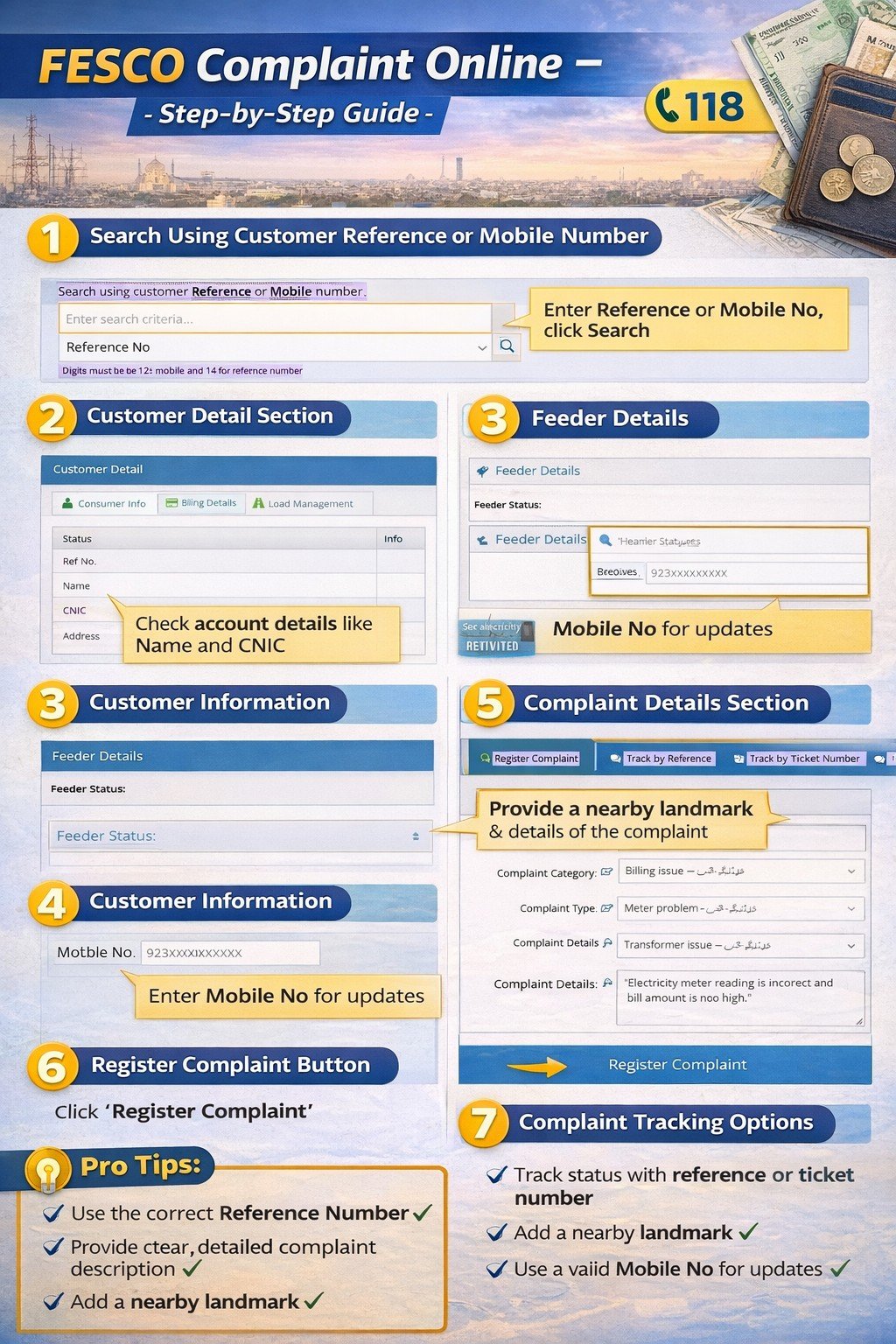
1. Search Using Customer Reference or Mobile Number
This section allows the system to locate your electricity connection before registering a complaint.
Details required:
FESCO Complaint Online
• Reference No – Enter your 14-digit electricity bill reference number
• Mobile Number – Alternatively enter your registered mobile number
• Search Button – Click the search icon to retrieve your account details
Once the system finds your account, the consumer information will appear automatically.
2. Customer Detail Section
After entering your reference number, the portal displays your electricity account information.
Information shown includes:
• Status – Current connection status
• Reference Number – Your electricity bill reference number
• Name – Registered consumer name
• CNIC – Identity card number of the consumer
• Address – Electricity connection address
• Contact Number – Registered phone number
• Feeder Code – Electricity feeder identification
This section helps verify that the correct consumer account has been selected.
3. Feeder Details
The feeder details section shows the electricity supply line connected to your area.
Information includes:
• Feeder status
• Supply line information
• Area electricity distribution details
This helps the electricity department identify network problems quickly.
4. Customer Information
Here you must provide your contact details for complaint updates.
Required field:
• Mobile Number – Enter your phone number starting with 923XXXXXXXXX format
The complaint status and updates are usually sent to this number.
5. Complaint Details Section
This is the most important part of the complaint form.
Fields include:
Nearest Place
• Enter a nearby landmark such as a school, mosque, or market
• Helps technicians locate the issue faster
Complaint Category
Select the main complaint category such as:
• Billing issue
• Power failure
• Meter problem
• Voltage issue
• Transformer problem
Complaint Type
Choose the specific type of complaint under the selected category.
Examples:
• Overbilling
• Meter reading error
• Line fault
• Power outage
• Load shedding complaint
Complaint Details
• Write a short description explaining the problem
• Example: “Electricity meter reading is incorrect and bill amount is too high.”
6. Register Complaint Button
After filling all required information:
• Click Register Complaint
• The system generates a Complaint Tracking Number
• Save this number to track your complaint status
7. Complaint Tracking Options
The portal also provides options to track complaints.
Available tracking methods:
• Track by Reference
• Track by Ticket Number
• Verify Customer Details
This helps consumers check progress anytime.